install SPICE on windows vm to replace proxmox default VNC
install SPICE on windows vm to replace proxmox default VNC
install SPICE on windows
6 Proxmox Install SPICE - YouTube
Install virt-viewer / Remote Viewer (recommended SPICE client). The SPICE project recommends virt-viewer, and points Windows users to the virt-manager download page for the installer. Virtual Machine Manager
on both your machine and vm.

SPICE Guest Tools Windows SPICE Guest Tools (spice-guest-tools) - This installer contains some optional drivers and services that can be installed in the Windows guest to improve SPICE performance and integration. This includes the qxl video driver and the SPICE guest agent (for copy and paste, automatic resolution switching, ...)
then shut down vm.
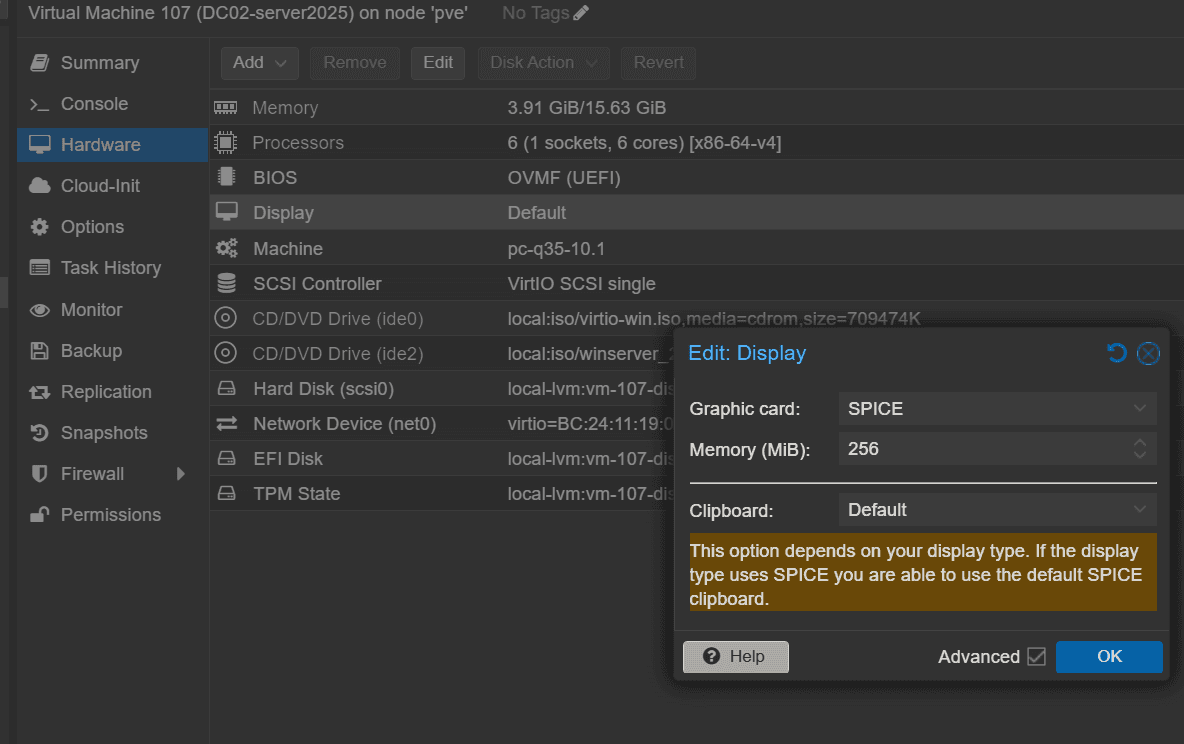
enable spice on proxmox vm config
VM → Hardware → Display → Edit
Set Graphic card = SPICE
Set Memory (VRAM) to something like 32 MiB (commonly enough even for high resolutions)
start VM → Console (dropdown) → SPICE
Proxmox will download a .vv connection file.
Open the .vv file with Remote Viewer (virt-viewer) to connect.
