Upgrading Mellanox ConnectX-4 Lx Firmware on Proxmox VE 9.2
This note records the process of identifying, backing up, and upgrading the firmware on a Mellanox ConnectX-4 Lx 25GbE SFP28 network adapter installed in a Proxmox VE 9.2 host. The upgrade was performed while troubleshooting a 25GbE NIC connected to a 10GbE SFP+ switch through a DAC cable.
System information
Host: HP EliteDesk 800 G6 SFF
Hypervisor: Proxmox VE 9.2
NIC: Mellanox ConnectX-4 Lx
PCI device: 0000:01:00.0
Device ID: MT27710
Driver: mlx5_core
PSID: MT_0000000267
Original firmware: 14.32.1900
Interface: nic_pve02_stor
Storage IP: 192.168.100.25/24
The NIC was detected correctly by Proxmox, but ethtool reported:
Speed: Unknown
Duplex: Unknown
Link detected: no
Link training failure, Remote side is not ready yet
root@pve02:~# ethtool nic_pve02_stor
Settings for nic_pve02_stor:
        Supported ports: [ Backplane ]
        Supported link modes:   1000baseKX/Full
                                10000baseKR/Full
                                25000baseCR/Full
                                25000baseKR/Full
                                25000baseSR/Full
        Supported pause frame use: Symmetric
        Supports auto-negotiation: Yes
        Supported FEC modes: None        RS      BASER
        Advertised link modes:  1000baseKX/Full
                                10000baseKR/Full
                                25000baseCR/Full
                                25000baseKR/Full
                                25000baseSR/Full
        Advertised pause frame use: Symmetric
        Advertised auto-negotiation: Yes
        Advertised FEC modes: Not reported
        Speed: Unknown!
        Duplex: Unknown! (255)
        Auto-negotiation: on
        Port: Direct Attach Copper
        PHYAD: 0
        Transceiver: internal
        Supports Wake-on: d
        Wake-on: d
        Link detected: no (Link training failure, Remote side is not ready yet)
The switch uses a 10GbE SFP+ port, while the ConnectX-4 Lx is a 25GbE SFP28 adapter. ConnectX-4 Lx supports both 10GbE and 25GbE, so firmware, DAC compatibility, and link negotiation were investigated. NVIDIA documents firmware updates as a normal maintenance procedure for ConnectX adapters and recommends verifying the exact adapter/PSID before flashing.
install and identify
apt update
apt install mstflint

root@pve02:~# mstflint -d 01:00.0 q
Image type:            FS3
FW Version:            14.32.1900
FW Release Date:       25.8.2024
Product Version:       14.32.1900
Rom Info:              type=UEFI version=14.25.17 cpu=AMD64,AARCH64
                       type=PXE version=3.6.502 cpu=AMD64
Description:           UID                GuidsNumber
Base GUID:             000030e3c0021f7a        4
Orig Base GUID:        N/A                     4
Base MAC:              00e3c0021f7a            4
Orig Base MAC:         N/A                     4
Image VSD:             N/A
Device VSD:            N/A
PSID:                  MT_0000000267
Security Attributes:   N/A
The PSID is especially important because NVIDIA uses it to identify the exact firmware configuration associated with an adapter. A firmware image intended for a different PSID should not be flashed
Back up the existing firmware
mkdir -p /root/mellanox-fw
cd /root/mellanox-fw

# Back up the firmware currently
mstflint -d 01:00.0 ri current-fw-backup.bin

# verify
ls -lh current-fw-backup.bin
download
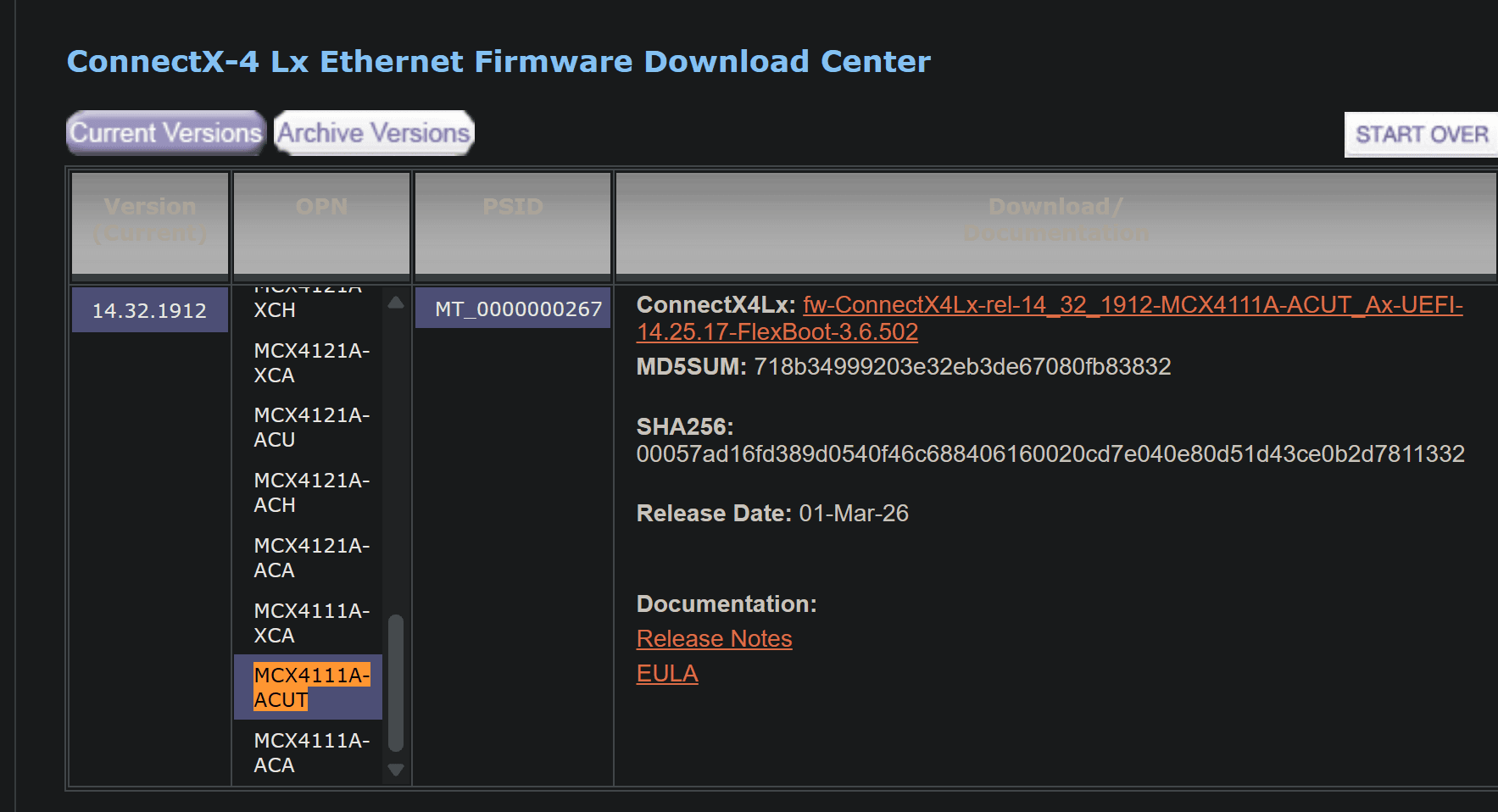
Firmware for ConnectX®-4 Lx EN
System information
Host: HP EliteDesk 800 G6 SFF
Hypervisor: Proxmox VE 9.2
NIC: Mellanox ConnectX-4 Lx
PCI device: 0000:01:00.0
Device ID: MT27710
Driver: mlx5_core
PSID: MT_0000000267
Original firmware: 14.32.1900
Interface: nic_pve02_stor
Storage IP: 192.168.100.25/24
The NIC was detected correctly by Proxmox, but ethtool reported:
Speed: Unknown
Duplex: Unknown
Link detected: no
Link training failure, Remote side is not ready yet
root@pve02:~# ethtool nic_pve02_stor
Settings for nic_pve02_stor:
        Supported ports: [ Backplane ]
        Supported link modes:   1000baseKX/Full
                                10000baseKR/Full
                                25000baseCR/Full
                                25000baseKR/Full
                                25000baseSR/Full
        Supported pause frame use: Symmetric
        Supports auto-negotiation: Yes
        Supported FEC modes: None        RS      BASER
        Advertised link modes:  1000baseKX/Full
                                10000baseKR/Full
                                25000baseCR/Full
                                25000baseKR/Full
                                25000baseSR/Full
        Advertised pause frame use: Symmetric
        Advertised auto-negotiation: Yes
        Advertised FEC modes: Not reported
        Speed: Unknown!
        Duplex: Unknown! (255)
        Auto-negotiation: on
        Port: Direct Attach Copper
        PHYAD: 0
        Transceiver: internal
        Supports Wake-on: d
        Wake-on: d
        Link detected: no (Link training failure, Remote side is not ready yet)
The switch uses a 10GbE SFP+ port, while the ConnectX-4 Lx is a 25GbE SFP28 adapter. ConnectX-4 Lx supports both 10GbE and 25GbE, so firmware, DAC compatibility, and link negotiation were investigated. NVIDIA documents firmware updates as a normal maintenance procedure for ConnectX adapters and recommends verifying the exact adapter/PSID before flashing.
install and identify
apt update
apt install mstflint

root@pve02:~# mstflint -d 01:00.0 q
Image type:            FS3
FW Version:            14.32.1900
FW Release Date:       25.8.2024
Product Version:       14.32.1900
Rom Info:              type=UEFI version=14.25.17 cpu=AMD64,AARCH64
                       type=PXE version=3.6.502 cpu=AMD64
Description:           UID                GuidsNumber
Base GUID:             000030e3c0021f7a        4
Orig Base GUID:        N/A                     4
Base MAC:              00e3c0021f7a            4
Orig Base MAC:         N/A                     4
Image VSD:             N/A
Device VSD:            N/A
PSID:                  MT_0000000267
Security Attributes:   N/A
The PSID is especially important because NVIDIA uses it to identify the exact firmware configuration associated with an adapter. A firmware image intended for a different PSID should not be flashed
Back up the existing firmware
mkdir -p /root/mellanox-fw
cd /root/mellanox-fw

# Back up the firmware currently
mstflint -d 01:00.0 ri current-fw-backup.bin

# verify
ls -lh current-fw-backup.bin
download
Firmware for ConnectX®-4 Lx EN
System information
Host: HP EliteDesk 800 G6 SFF
Hypervisor: Proxmox VE 9.2
NIC: Mellanox ConnectX-4 Lx
PCI device: 0000:01:00.0
Device ID: MT27710
Driver: mlx5_core
PSID: MT_0000000267
Original firmware: 14.32.1900
Interface: nic_pve02_stor
Storage IP: 192.168.100.25/24
The NIC was detected correctly by Proxmox, but ethtool reported:
Speed: Unknown
Duplex: Unknown
Link detected: no
Link training failure, Remote side is not ready yet
root@pve02:~# ethtool nic_pve02_stor
Settings for nic_pve02_stor:
        Supported ports: [ Backplane ]
        Supported link modes:   1000baseKX/Full
                                10000baseKR/Full
                                25000baseCR/Full
                                25000baseKR/Full
                                25000baseSR/Full
        Supported pause frame use: Symmetric
        Supports auto-negotiation: Yes
        Supported FEC modes: None        RS      BASER
        Advertised link modes:  1000baseKX/Full
                                10000baseKR/Full
                                25000baseCR/Full
                                25000baseKR/Full
                                25000baseSR/Full
        Advertised pause frame use: Symmetric
        Advertised auto-negotiation: Yes
        Advertised FEC modes: Not reported
        Speed: Unknown!
        Duplex: Unknown! (255)
        Auto-negotiation: on
        Port: Direct Attach Copper
        PHYAD: 0
        Transceiver: internal
        Supports Wake-on: d
        Wake-on: d
        Link detected: no (Link training failure, Remote side is not ready yet)
The switch uses a 10GbE SFP+ port, while the ConnectX-4 Lx is a 25GbE SFP28 adapter. ConnectX-4 Lx supports both 10GbE and 25GbE, so firmware, DAC compatibility, and link negotiation were investigated. NVIDIA documents firmware updates as a normal maintenance procedure for ConnectX adapters and recommends verifying the exact adapter/PSID before flashing.
install and identify
apt update
apt install mstflint

root@pve02:~# mstflint -d 01:00.0 q
Image type:            FS3
FW Version:            14.32.1900
FW Release Date:       25.8.2024
Product Version:       14.32.1900
Rom Info:              type=UEFI version=14.25.17 cpu=AMD64,AARCH64
                       type=PXE version=3.6.502 cpu=AMD64
Description:           UID                GuidsNumber
Base GUID:             000030e3c0021f7a        4
Orig Base GUID:        N/A                     4
Base MAC:              00e3c0021f7a            4
Orig Base MAC:         N/A                     4
Image VSD:             N/A
Device VSD:            N/A
PSID:                  MT_0000000267
Security Attributes:   N/A
The PSID is especially important because NVIDIA uses it to identify the exact firmware configuration associated with an adapter. A firmware image intended for a different PSID should not be flashed
Back up the existing firmware
mkdir -p /root/mellanox-fw
cd /root/mellanox-fw

# Back up the firmware currently
mstflint -d 01:00.0 ri current-fw-backup.bin

# verify
ls -lh current-fw-backup.bin
download
Firmware for ConnectX®-4 Lx EN
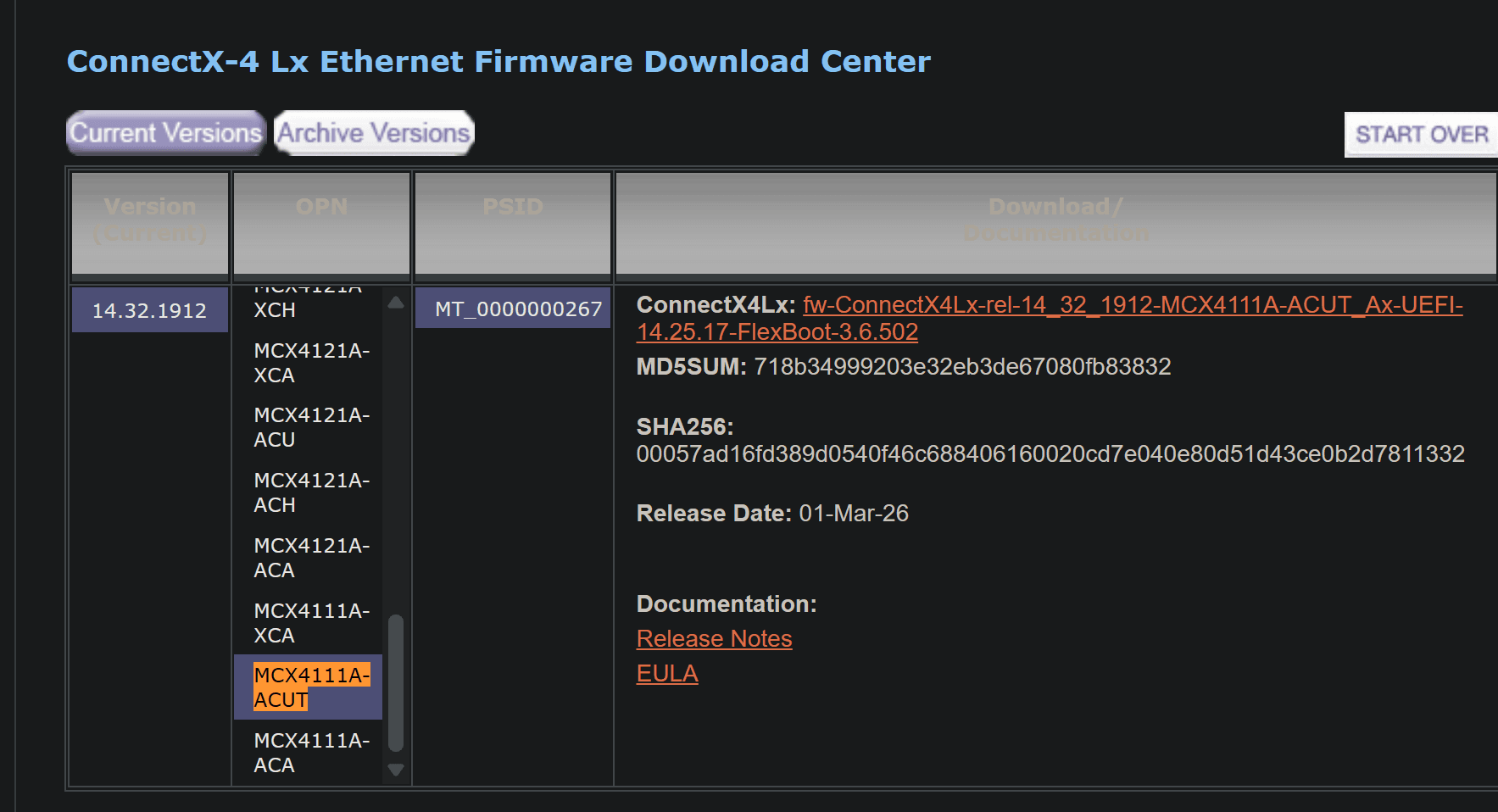
wget -P /root/mellanox-fw/firmware.bin.zip https://www.mellanox.com/downloads/firmware/fw-ConnectX4Lx-rel-14_32_1912-MCX4111A-ACUT_Ax-UEFI-14.25.17-FlexBoot-3.6.502.bin.zip

unzip firmware.bin.zip

# validate the firmware version
root@pve02:~/mellanox-fw# mstflint -i firmware.bin q
Image type:            FS3
FW Version:            14.32.1912
FW Release Date:       21.1.2026
Product Version:       rel-14_32_1912
Rom Info:              type=UEFI version=14.25.17 cpu=AMD64,AARCH64
                       type=PXE version=3.6.502 cpu=AMD64
Description:           UID                GuidsNumber
Base GUID:             N/A                     4
Base MAC:              N/A                     4
Image VSD:             N/A
Device VSD:            N/A
PSID:                  MT_0000000267
Security Attributes:   N/A
Before flashing, query the firmware image. The image PSID and adapter PSID should both be the same.
upgrade
# shutdown nic
ip link set nic_pve02_stor down

# apply the firmware
root@pve02:~/mellanox-fw# mstflint -d 01:00.0 -i firmware.bin burn

    Current FW version on flash:  14.32.1900
    New FW version:               14.32.1912

FSMST_INITIALIZE -   OK
Writing Boot image component -   OK
Restoring signature                     - OK
-I- To load new FW run mstfwreset or reboot machine.

# reboot system to apply
reboot

# hardcode the setting
ethtool -s nic_pve02_stor speed 10000 duplex full autoneg off
ip link set nic_pve02_stor down
sleep 2
ip link set nic_pve02_stor up


# test if it working

root@pve02:~# ethtool nic_pve02_stor
Settings for nic_pve02_stor:
        Supported ports: [ Backplane ]
        Supported link modes:   1000baseKX/Full
                                10000baseKR/Full
                                25000baseCR/Full
                                25000baseKR/Full
                                25000baseSR/Full
        Supported pause frame use: Symmetric
        Supports auto-negotiation: Yes
        Supported FEC modes: None        RS      BASER
        Advertised link modes:  1000baseKX/Full
                                10000baseKR/Full
                                25000baseCR/Full
                                25000baseKR/Full
                                25000baseSR/Full
        Advertised pause frame use: Symmetric
        Advertised auto-negotiation: Yes
        Advertised FEC modes: None
        Speed: 10000Mb/s
        Lanes: 1
        Duplex: Full
        Auto-negotiation: on
        Port: Direct Attach Copper
        PHYAD: 0
        Transceiver: internal
        Supports Wake-on: d
        Wake-on: d
        Link detected: yes
root@pve02:~# ping 192.168.100.11
PING 192.168.100.11 (192.168.100.11) 56(84) bytes of data.
64 bytes from 192.168.100.11: icmp_seq=1 ttl=64 time=1.92 ms
64 bytes from 192.168.100.11: icmp_seq=2 ttl=64 time=1.48 ms
The firmware upgrade procedure provides a controlled way to eliminate outdated NIC firmware as a possible cause of SFP+/SFP28 link negotiation problems. If the card still has no carrier after upgrading, troubleshooting should move to the DAC cable, switch port speed, autonegotiation, FEC settings, and transceiver compatibility rather than IP or VLAN configuration.
wget -P /root/mellanox-fw/firmware.bin.zip https://www.mellanox.com/downloads/firmware/fw-ConnectX4Lx-rel-14_32_1912-MCX4111A-ACUT_Ax-UEFI-14.25.17-FlexBoot-3.6.502.bin.zip

unzip firmware.bin.zip

# validate the firmware version
root@pve02:~/mellanox-fw# mstflint -i firmware.bin q
Image type:            FS3
FW Version:            14.32.1912
FW Release Date:       21.1.2026
Product Version:       rel-14_32_1912
Rom Info:              type=UEFI version=14.25.17 cpu=AMD64,AARCH64
                       type=PXE version=3.6.502 cpu=AMD64
Description:           UID                GuidsNumber
Base GUID:             N/A                     4
Base MAC:              N/A                     4
Image VSD:             N/A
Device VSD:            N/A
PSID:                  MT_0000000267
Security Attributes:   N/A
Before flashing, query the firmware image. The image PSID and adapter PSID should both be the same.
upgrade
# shutdown nic
ip link set nic_pve02_stor down

# apply the firmware
root@pve02:~/mellanox-fw# mstflint -d 01:00.0 -i firmware.bin burn

    Current FW version on flash:  14.32.1900
    New FW version:               14.32.1912

FSMST_INITIALIZE -   OK
Writing Boot image component -   OK
Restoring signature                     - OK
-I- To load new FW run mstfwreset or reboot machine.

# reboot system to apply
reboot

# hardcode the setting
ethtool -s nic_pve02_stor speed 10000 duplex full autoneg off
ip link set nic_pve02_stor down
sleep 2
ip link set nic_pve02_stor up


# test if it working

root@pve02:~# ethtool nic_pve02_stor
Settings for nic_pve02_stor:
        Supported ports: [ Backplane ]
        Supported link modes:   1000baseKX/Full
                                10000baseKR/Full
                                25000baseCR/Full
                                25000baseKR/Full
                                25000baseSR/Full
        Supported pause frame use: Symmetric
        Supports auto-negotiation: Yes
        Supported FEC modes: None        RS      BASER
        Advertised link modes:  1000baseKX/Full
                                10000baseKR/Full
                                25000baseCR/Full
                                25000baseKR/Full
                                25000baseSR/Full
        Advertised pause frame use: Symmetric
        Advertised auto-negotiation: Yes
        Advertised FEC modes: None
        Speed: 10000Mb/s
        Lanes: 1
        Duplex: Full
        Auto-negotiation: on
        Port: Direct Attach Copper
        PHYAD: 0
        Transceiver: internal
        Supports Wake-on: d
        Wake-on: d
        Link detected: yes
root@pve02:~# ping 192.168.100.11
PING 192.168.100.11 (192.168.100.11) 56(84) bytes of data.
64 bytes from 192.168.100.11: icmp_seq=1 ttl=64 time=1.92 ms
64 bytes from 192.168.100.11: icmp_seq=2 ttl=64 time=1.48 ms
The firmware upgrade procedure provides a controlled way to eliminate outdated NIC firmware as a possible cause of SFP+/SFP28 link negotiation problems. If the card still has no carrier after upgrading, troubleshooting should move to the DAC cable, switch port speed, autonegotiation, FEC settings, and transceiver compatibility rather than IP or VLAN configuration.
wget -P /root/mellanox-fw/firmware.bin.zip https://www.mellanox.com/downloads/firmware/fw-ConnectX4Lx-rel-14_32_1912-MCX4111A-ACUT_Ax-UEFI-14.25.17-FlexBoot-3.6.502.bin.zip

unzip firmware.bin.zip

# validate the firmware version
root@pve02:~/mellanox-fw# mstflint -i firmware.bin q
Image type:            FS3
FW Version:            14.32.1912
FW Release Date:       21.1.2026
Product Version:       rel-14_32_1912
Rom Info:              type=UEFI version=14.25.17 cpu=AMD64,AARCH64
                       type=PXE version=3.6.502 cpu=AMD64
Description:           UID                GuidsNumber
Base GUID:             N/A                     4
Base MAC:              N/A                     4
Image VSD:             N/A
Device VSD:            N/A
PSID:                  MT_0000000267
Security Attributes:   N/A
Before flashing, query the firmware image. The image PSID and adapter PSID should both be the same.
upgrade
# shutdown nic
ip link set nic_pve02_stor down

# apply the firmware
root@pve02:~/mellanox-fw# mstflint -d 01:00.0 -i firmware.bin burn

    Current FW version on flash:  14.32.1900
    New FW version:               14.32.1912

FSMST_INITIALIZE -   OK
Writing Boot image component -   OK
Restoring signature                     - OK
-I- To load new FW run mstfwreset or reboot machine.

# reboot system to apply
reboot

# hardcode the setting
ethtool -s nic_pve02_stor speed 10000 duplex full autoneg off
ip link set nic_pve02_stor down
sleep 2
ip link set nic_pve02_stor up


# test if it working

root@pve02:~# ethtool nic_pve02_stor
Settings for nic_pve02_stor:
        Supported ports: [ Backplane ]
        Supported link modes:   1000baseKX/Full
                                10000baseKR/Full
                                25000baseCR/Full
                                25000baseKR/Full
                                25000baseSR/Full
        Supported pause frame use: Symmetric
        Supports auto-negotiation: Yes
        Supported FEC modes: None        RS      BASER
        Advertised link modes:  1000baseKX/Full
                                10000baseKR/Full
                                25000baseCR/Full
                                25000baseKR/Full
                                25000baseSR/Full
        Advertised pause frame use: Symmetric
        Advertised auto-negotiation: Yes
        Advertised FEC modes: None
        Speed: 10000Mb/s
        Lanes: 1
        Duplex: Full
        Auto-negotiation: on
        Port: Direct Attach Copper
        PHYAD: 0
        Transceiver: internal
        Supports Wake-on: d
        Wake-on: d
        Link detected: yes
root@pve02:~# ping 192.168.100.11
PING 192.168.100.11 (192.168.100.11) 56(84) bytes of data.
64 bytes from 192.168.100.11: icmp_seq=1 ttl=64 time=1.92 ms
64 bytes from 192.168.100.11: icmp_seq=2 ttl=64 time=1.48 ms
The firmware upgrade procedure provides a controlled way to eliminate outdated NIC firmware as a possible cause of SFP+/SFP28 link negotiation problems. If the card still has no carrier after upgrading, troubleshooting should move to the DAC cable, switch port speed, autonegotiation, FEC settings, and transceiver compatibility rather than IP or VLAN configuration.